

In cyberspace, everyone occasionally uses SSH. If you’ve logged into a remote Linux server or system, there’s a good chance OpenSSH was involved.
OpenSSH runs quietly in the background on the cloud servers, VPS instances, home labs, and enterprise infrastructure.
This runs on every device, yet many people are unaware of it. But after reading this article, you can understand the basics and how to use it properly.
What is SSH?
SSH stands for Secure Shell.
SSH is a network protocol that lets you securely access and manage another system over an unsecured network. In other words, it replaces insecure remote access, such as Telnet, by encrypting and creating a secure tunnel.
To run the command:
ssh user@0.0.0.0Without SSH, remote server management would be risky and exposed.
What is OpenSSH?
OpenSSH is the most widely used open-source implementation of the SSH protocol.
It was originally developed by the OpenBSD project. By default, SSH is available in most Linux and Unix-like systems.
In simple terms:
- SSH is the protocol.
- OpenSSH is the software that implements it.
Example: Think of a secure armoured car for your data. However, if the driver (the configuration) leaves the doors open, the armour is of no use. To move from functional to hardened, we need to move beyond the basics.
How does OpenSSH secure your data?
OpenSSH uses Asymmetric Encryption to ensure that even if someone intercepts your traffic, they see nothing but gibberish. This relies on a mathematical relationship:
- Public Key: Stays on the server (like a padlock).
- Private Key: Stays on your computer (like the physical key).
The security follows the principles:
Encrypted Data + Private Key = Access Granted
Critical Hardening Steps
To increase your security immediately, we need to edit the configuration file located at /etc/ssh/sshd_config.
- Disable Root Login
Logging in as root is a massive security loophole. Hackers already know the username is “root”, so they only have to guess the password. If they succeed, they can have access to your system. So, after disabling the root account, the system can prevent unnecessary risk.
Steps:
- Create a normal user.
- Grant that user sudo privileges.
- Disable root login via SSH.
Edit SSH config:
sudo nano /etc/ssh/sshd_config

> PermitRootLogin no

sudo systemctl restart sshd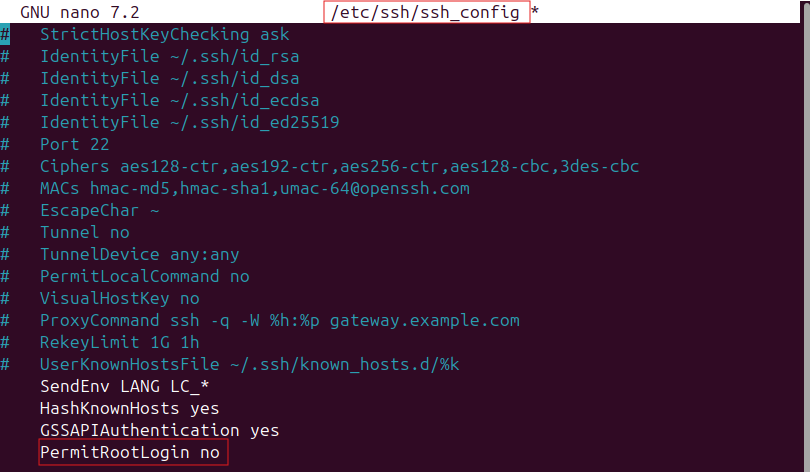
- Change the default SSH port (optional but helpful)
By default, SSH listens on port 22. Automated scanners can target the port. Changing the port won’t stop attackers, but it will delay or reduce noise.
In sshd_config:
Port 2222Restart SSH, then connect with:
ssh -p 2222 user@0.0.0.0- Limit the number of users who can log in
Not every user should have SSH access.
Restrict access by username:
AllowUsers admin johnOr restrict by groups
AllowGroups sshusersAdvanced Security: Eliminating the Password
Passwords are the weakest link in any supply chain. To truly harden your server, you must move to SSH Key Authentication.
- Generate a Key Pair:
Run ssh-keygen on your local machine.
ssh-keygen -t ed25519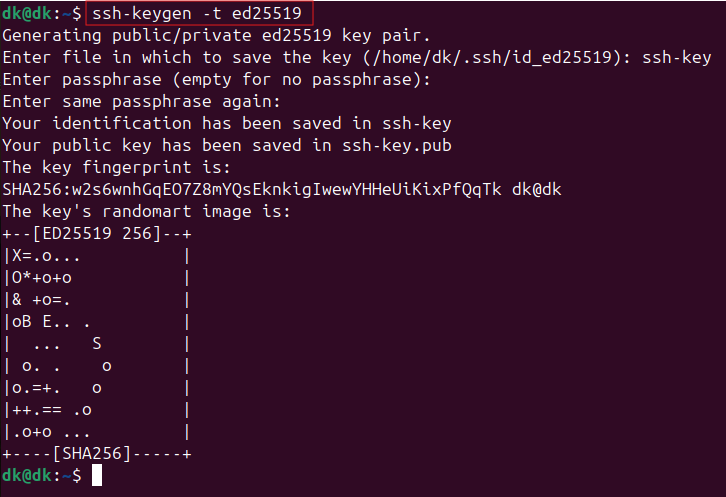
- Disable Password Login:
Once the generated key pair is tested and working, so find PasswordAuthentication in your configuration and set it to no.
Pro-Active Defence
- Fail2Ban
Even with keys and all the above different steps, hackers and bots will still try to connect. Fail2Ban is a service that monitors your logs. If it sees an IP address failing to log in multiple times, it creates a firewall rule to ban that IP permanently.
To install on Ubuntu/Debian:
sudo apt install fail2banIt works silently in the background, keeping your logs clean and your CPU cycles free from processing fake login attempts.
- Uncomplicated Firewall (UFW):
UFW is a user-friendly command-line firewall management tool for Ubuntu/Debian. It simplifies network security by using iptables to manage IPv4 and IPv6 traffic, defaulting to a policy of denying all incoming connections while allowing all outgoing traffic.
Read More: Build and Configure a Firewall: Enhancing Network Security on Ubuntu SystemsConclusion
OpenSSH is the backbone of secure remote administration. It’s not flashy, nor does it have a GUI.
But it quietly protects millions of servers every day. If you work with Linux, cloud infrastructure, DevOps pipelines, or cybersecurity, understanding OpenSSH isn’t optional. It’s foundational.
And once you understand what it does, the next logical step is learning how to harden it properly. Because the same tool that gives you secure access can also become your biggest exposure if left misconfigured.
References
- What is asymmetric encryption?
- Get started with OpenSSH for Windows
- Quick Introduction to SSH for Mac Admins
- SSH Essentials: Working with SSH Servers, Clients, and Keys