

The Nmap Scripting Engine (NSE) is an important feature of Nmap. It allows users to automate scans by running scripts from the command line. NSE supports only Lua scripts.
Real-world use case: A network administrator can run automated, predefined scans of the organization’s network/server regularly. This can be really useful for detecting misconfigurations and out-of-date software, which can pose significant threats.
NSE lets you run these types of scans:
- Advanced version detection
- Backdoor detection
- Network discovery
- Vulnerability detection
- Vulnerability exploration
A total of 610 scripts are available for users. The default path of the location where the Nmap Scripting Engine scripts are stored is
/usr/share/nmap/scripts/This allows users to quickly locate and access scripts on their systems.
Update the script database, run the following command:
nmap --script-updatedbCategories
Some key NSE script categories include:
- Auth: Scripts related to authentication mechanisms.
- Vuln: Scripts that check for known vulnerabilities.
- Discovery: Scripts that aid in the discovery of hosts and services on a network.
Below is a complete list of categories a user can use to get details about the target:
| Category | Description |
|---|---|
| auth | Determines authentication credentials |
| broadcast | Uses broadcasting for host discovery |
| brute | Attempts brute-force login with predefined credentials |
| default | Default scripts executed with the -sC option |
| discovery | Evaluates accessible services |
| dos | Check for denial-of-service vulnerabilities |
| exploit | Tries to exploit known vulnerabilities |
| external | Uses external services for further processing |
| fuzzer | Sends random inputs to test vulnerability handling |
| intrusive | Runs potentially disruptive scripts that could affect system stability |
| malware | Checks for known malware on the target system |
| safe | Defensive scripts that perform non-intrusive scans |
| version | Enhances service version detection |
| vuln | Identifies known vulnerabilities in services |
Practical Usage
- Default Script
nmap -sS -sC testphp.vulnweb.com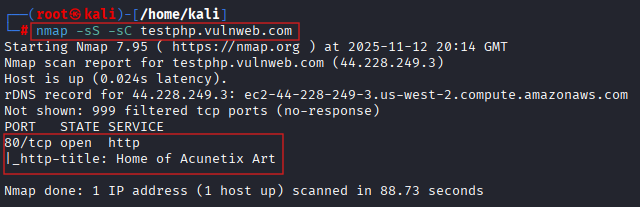
| Options | Description |
|---|---|
| -sC | Shortcut for running the default set of NSE scripts. –script=default |
| -sS | Scan TCP port |
The default script covers basic information gathering, banner grabbing, port scanning, and service detection.
- Performing vulnerability assessments
nmap --script vuln testphp.vulnweb.com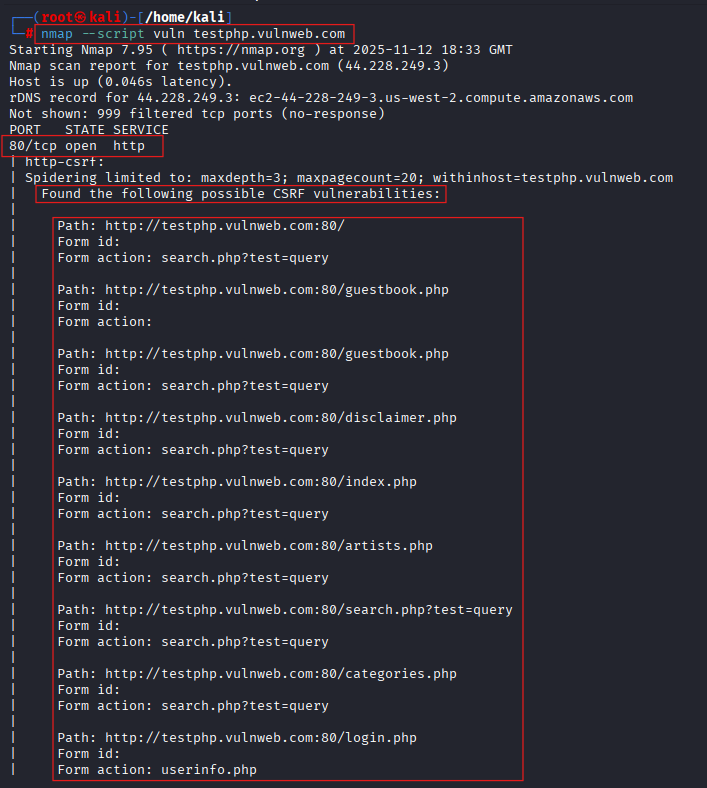
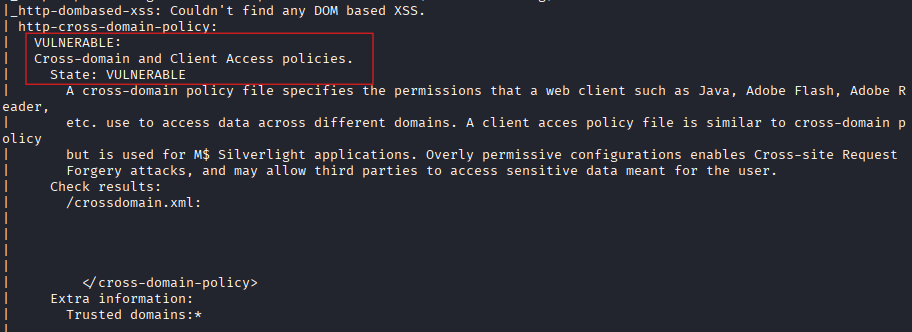
We ran a vulnerability scan on the target and found a CSRF and a cross-domain issue.
Cross-Site Request Forgery (CSRF) exploits the trust a web application has in a user’s browser, allowing unauthorized commands to be transmitted. A cross-domain vulnerability poses significant risks by enabling unauthorized access or data exposure across domains. The NSE detected these vulnerabilities by running specialized scripts designed to identify them.
- Running exploitation scan
nmap --script exploit testphp.vulnweb.com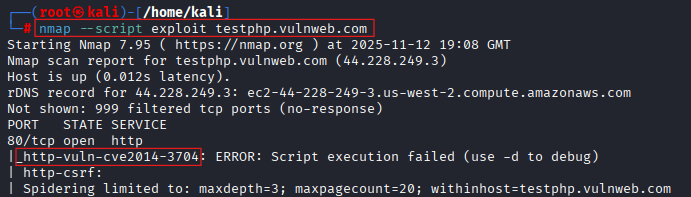
The above script gathers information on common vulnerabilities and tells us which can be effectively exploited.
As you can see, the scan returned the CVE number. With this exploit, the target can be exploited.
- Discovery scan
nmap --script discovery testphp.vulnweb.com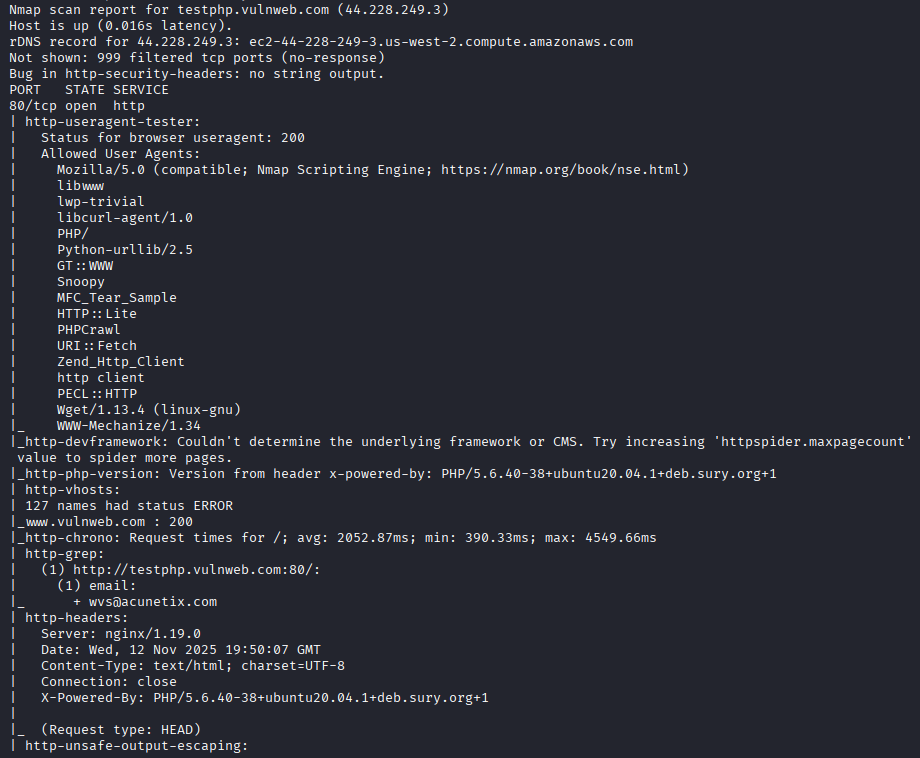
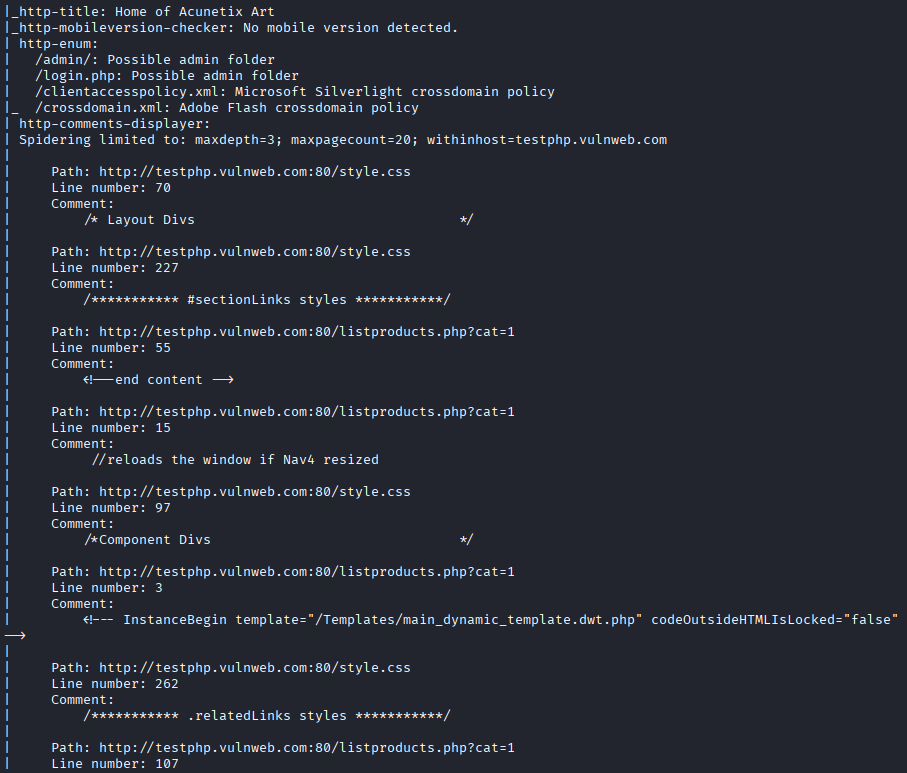
This script helps us discover information about the target. For example, HTTP headers, files (PHP, CSS, XML), HTTP PHP version, and enumerating secret files (admin, login, policies).
Write your own scripts
Learning Lua programming is an excellent place to start if you want to write your own scripts with NSE. Consider materials that provide a thorough introduction to Lua programming, such as books or online tutorials.
Start by writing basic scripts to perform simple tasks, such as identifying popular network services or scanning specific ports. For example, a basic starter script might look like this:
---
-- Simple example Nmap Scripting Engine (NSE) script
--

description = [[
A very basic Nmap Scripting Engine script that prints
the host IP and port number it runs against.
]]

---
-- @usage
-- nmap -p 80 --script ./my-first-script.nse <target>

author = "Dark Knight"
license = "GNU GPLv2"
categories = {"discovery"}

local shortport = require "shortport"

-- Run on any OPEN TCP or UDP port
portrule = function(host, port)
  return port.state == "open"
end

action = function(host, port)
  local output = {}
  table.insert(output, "Hello from NSE!")
  table.insert(output, "Host: " .. host.ip)
  table.insert(output, "Port: " .. port.number .. "/" .. port.protocol)

  -- Returned string is printed under the script name
  return table.concat(output, "\n  ")
end
We save this file as my-first-script.nse. We will run this script against a target, and let’s see what we get as output.
nmap --script ./my-first-script.nse testphp.vulnweb.com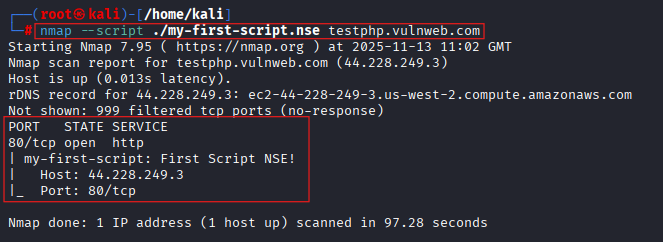
With our first script, we found out about port 80 and the service running on it.
As you can see, we can make our own script to get better results.
You can progressively advance to more difficult tasks as your confidence grows. To exchange ideas and receive feedback on your scripts, don’t forget to make use of the many community resources and forums.
Reddit, Stack Overflow, and other cybersecurity forums are some excellent resources for interacting with other Nmap users.
As you advance your scripting abilities, participating in these groups can offer insightful advice and encouragement.
Risk and Precautions
- Some scripts are aggressive
Numerous NSE scripts can put vulnerable devices under stress by sending unusual packets, a lot of queries, or protocol checks.
Examples:
- http-brute
- dns-brute
- ftp-brute
- smb-vuln* vulnerability checkers
- dos* scripts (rare but exist)
If the device is old, misconfigured, or fragile, it can freeze, reboot, or start logging errors.
Precaution: Stick to safe, version, or discovery categories unless you explicitly intend to be aggressive.
- Some scripts change things
While some NSE scripts change configurations or initiate actions, the majority are read-only.
Examples:
- Scripts that try default creds and log in
- Scripts that test SMB interactions
- Scripts that try RPC calls
- Some exploit checks may touch files or run commands.
Precaution: Check the script’s category. If you see anything like:
- intrusive
- exploit
- malware
- auth
…pause and reconsider.
- You may accidentally run too many scripts
People often do:
nmap --script vuln <target>Suddenly, more than forty vulnerability-check programs launch simultaneously.. That can create:
- heavy traffic
- false positives
- angry firewalls
- logs blowing up
- detection alerts
Precaution: Specify exactly what you want to run:
nmap --script smb-vuln-ms17-010 <target>- IDS/IPS will absolutely notice
Traffic from NSE scripts may trip detectors. In a business setting, anticipate:
- Alerts
- Ticket generation
- Firewall blocks
- SOC teams are asking what’s going on
Precaution: Inform whoever owns the network.
- Legal/ethical considerations
The network owner may see the execution of an intrusive script as unlawful activity even if it was not your intention.
Unauthorised scanning may result in legal issues in numerous nations.
Precaution: Only scan systems you own or have written permission for.
- Performance impact
Some scripts perform full enumeration:
- SMB shares
- HTTP directory listing
- SNMP walks
- SSL/TLS handshake enumeration
- Database requests
These can slow services down temporarily.
Precaution: Run during maintenance windows if possible, or throttle with:
--script-timeout 5s- Your own machine can get noisy
Brute-force scripts can spam your network interface.
Example:
http-brutesmtp-bruteThese can generate noticeable outgoing traffic.
Precaution: Know what you’re running. Nmap Scripting Engine scripts are code.
Quick safe checklist
Before running any Nmap Scripting Engine (NSE) script, ask yourself:
- Do I have permission?
- Do I know the script category?
- Am I on a production network?
- Will this script send high traffic?
- Will it log into anything?
- Will it modify anything?
- Should I set a timeout or rate limit?
Conclusion
Nmap’s Scripting Engine provides users with a powerful tool for thorough target scanning. It gives customers the freedom to customise scans to meet specific network requirements and to automate complex scanning procedures.
Because users can effectively identify weaknesses, unauthorised access points, and ensure adherence to organisational security regulations, this translates into proactive security measures.
Nmap Scripting Engine (NSE) enables both inexperienced and seasoned users to improve their network security tactics by utilising its extensive script library and the ease of Lua scripting.
In conclusion, both network managers and security experts can benefit greatly from the Nmap Scripting Engine. I urge you to investigate its features and witness directly how it might strengthen your network defences.